
Watchlists, Charts, Options Added to Hub

TradeStation launched HUB in late 2024 as a centralized location for customers to access their accounts. Today it's enabling three new features.
The key advances include:
- Synced watchlists
- Symbol detail & charts
- Options chains and trading
Synced Watchlists
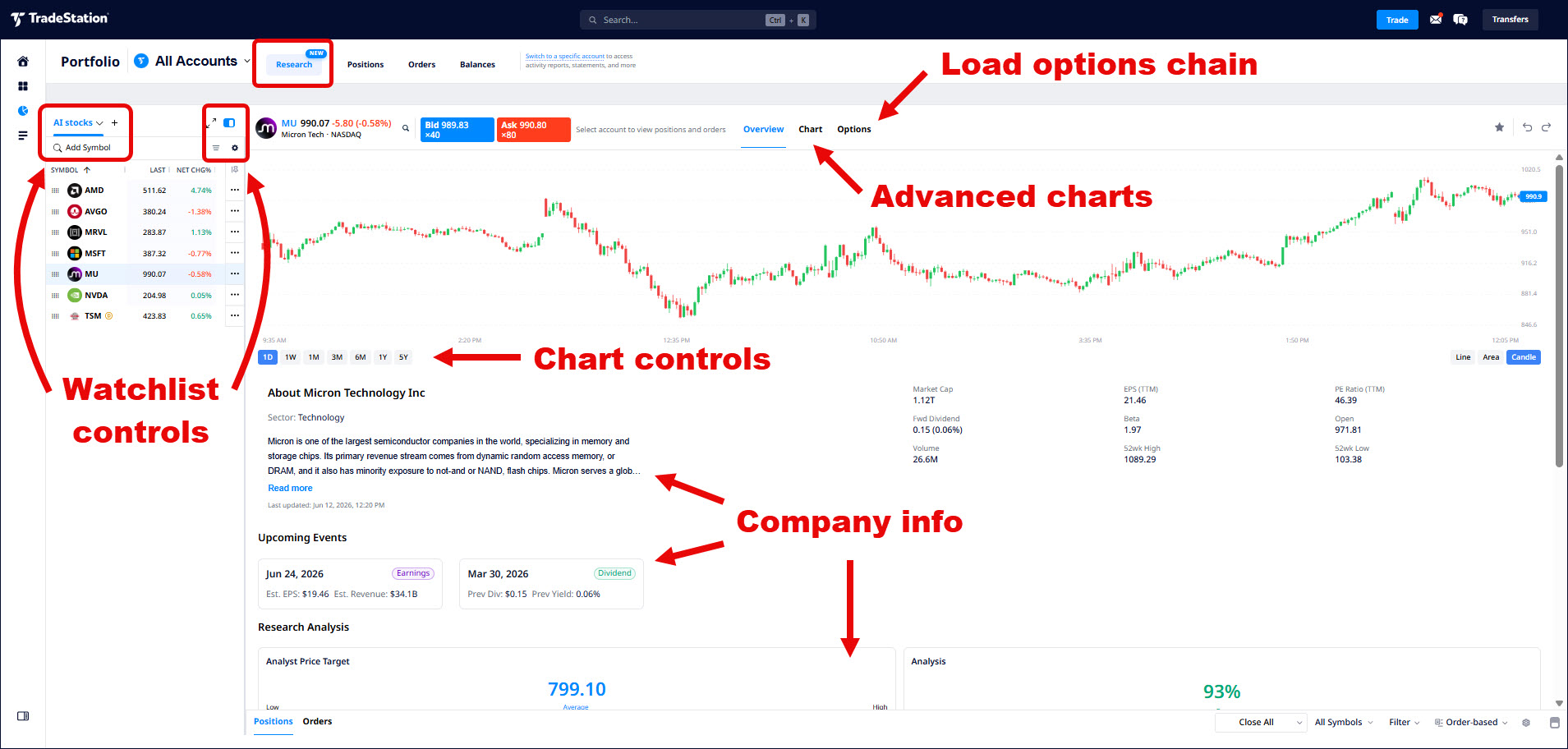
Watchlists live in the Portfolio area of HUB. Open Portfolio, select the Research tab and look on the left. Watchlists may be hidden, and can be opened by clicking the expand button. Hovering over a watchlist name activates a menu to select other watchlists. Users can add new watchlists by clicking the + button.
You can create multiple lists based around key interests or themes, like AI, chips or energy.
The watchlist section includes columns such as net change or bid and ask. Users can add or remove columns by clicking on the gear at the top right. You can also export the list as an Excel file or CSV document.
Column settings and sort order persist, so lists appear the same each time they're opened. The same applies across platforms: a list you build or edit in HUB syncs to TITAN X and Mobile within about a minute, and changes made on any platform flow back the same way. The intent is one set of watchlists everywhere, instead of a separate copy on each screen.
Traders can also access Hotlists, which include items like big movers or stocks with unusual volume.
Symbol Detail & Charts
Once a watchlist is loaded, customers can learn more about individual stocks by clicking on the symbol. This loads a chart and company details like:
- Next earnings date
- Market capitalization
- Business description
Scrolling down loads more information like analyst price targets, ratings, and recent news.
Users can also view a stock not on the watchlist by typing its symbol into the Search... box at the top.
Customers looking to trade the stock can click the Bid or Ask buttons, which activates the order ticket on the right sidebar.
Chart Trading
The chart can also be adjusted with the time frame buttons at the bottom of the display. Clicking on the Chart button at the top (next to Overview) loads a more detailed chart with drawing tools and technical indicators. Markups are remembered for future sessions.
You can also place trades directly from charts by right-clicking on the detailed chart. This lets customers select key price levels for setting limit orders.
Options Trading
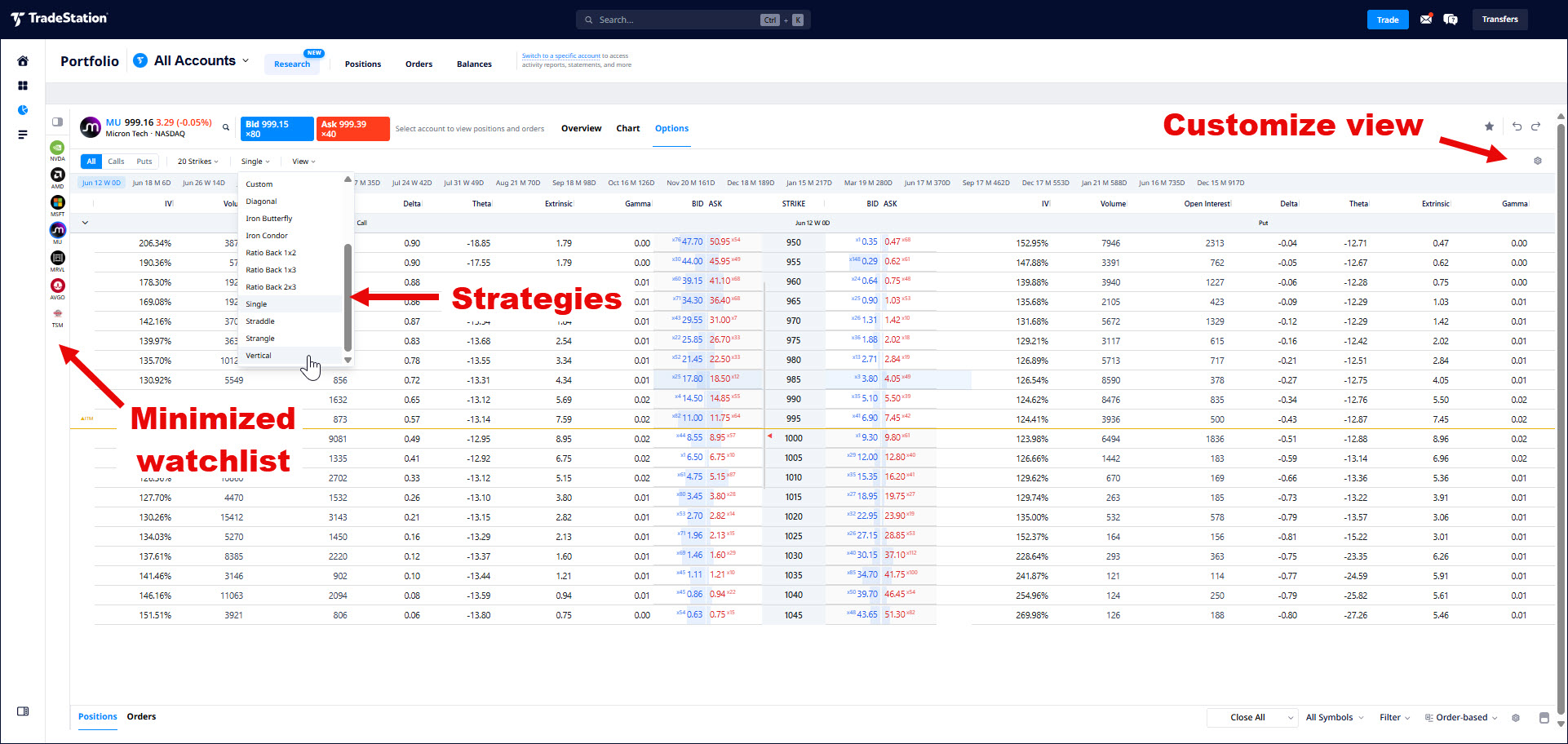
The third new feature is options trading in Hub, which can be launched by clicking Options in the top section.
Key controls in the top section include:
- Screening for calls, puts and all contracts
- The Strikes menu controls the number of contracts to show. It also lets users set a price range of strike prices to view. (This can be especially useful for constructing calendar spreads.)
- Strategies like Butterfly, Calendar and more are available in the next menu, which may initially be labeled "Single."
- The View menu lets traders select settings like expiration type (weekly, monthly etc) and other items.
Data in columns, like Greeks, Volume and Open Interest can be controlled with the gear on the far right.
Traders can also click on the blue BID values to load a sell order. Clicking on the red ASK initiates a purchase.
In conclusion, Hub was already a convenient one-stop destination for customers managing their accounts. It's now an increasingly useful tool for monitoring, analyzing and trading.
Options trading is not suitable for all investors. Your TradeStation Securities' account application to trade options will be considered and approved or disapproved based on all relevant factors, including your trading experience. See www.TradeStation.com/DisclosureOptions. Visit www.TradeStation.com/Pricing for full details on the costs and fees associated with options.
Margin trading involves risks, and it is important that you fully understand those risks before trading on margin. The Margin Disclosure Statement outlines many of those risks, including that you can lose more funds than you deposit in your margin account; your brokerage firm can force the sale of securities in your account; your brokerage firm can sell your securities without contacting you; and you are not entitled to an extension of time on a margin call. Review the Margin Disclosure Statement at www.TradeStation.com/DisclosureMargin.