
01

Open your account
Open a new TradeStation account using offer code TSTVAGSF.
Using offer code TSTVAGSF
Integrated with TradeStation
Open and fund a new TradeStation account with $5,000 or more, and we'll deposit $50 into your account each month for five months, for a total of $250.
Every stock and options order you route through TradingView executes at $0 commission** and you can trade futures at just $0.85 per side.
Stocks and options are traded through your TradeStation Equities account, and futures through a separate Futures account.
.png)
Get started in four simple steps:
01
Open a new TradeStation account using offer code TSTVAGSF.
02

Fund with $5,000 or more in new assets within 45 days of opening your account.
03

Authenticate your TradeStation account to the TradingView trading panel. This activates your eligibility for the monthly credits.
04

Receive $50 each month for five months, starting the month after your funding period ends.
Maintain your balance and stay connected to TradingView each month to qualify for each credit, up to $250 total.
You'll need two things: a funded TradeStation account and a free TradingView account. Once you have both, connecting them takes just a few clicks.
Open a chart on TradingView, select TradeStation from the broker list, log in, and you're ready to trade.
This video walks through the full process step by step, from opening your first chart to seeing your account balances in TradingView's trading panel.
Use offer code TSTVAGSF to get started. Most applications are completed in about five minutes. Fund your account to start earning.
From our first integration in 2019 to winning TradingView's Broker of the Year in 2025,² the track record speaks for itself.
Years of integration
TradeStation clients on TradingView¹
TradingView Broker of the Year
Trade options on TradingView with TradeStation
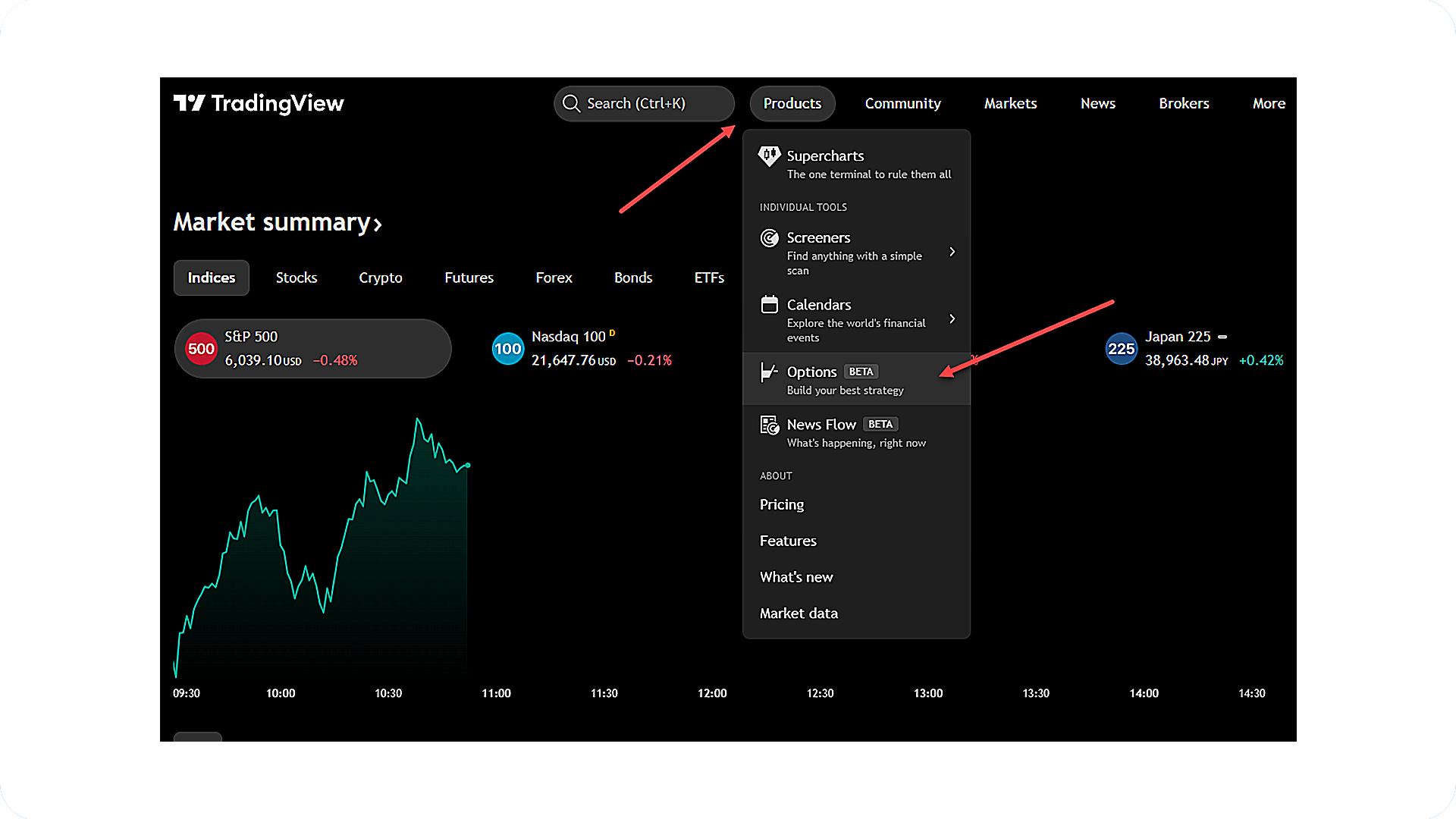
Access TradingView's options tools directly from the Products menu. From here you can explore the strategy builder, options chain, and volatility analyzer. Execute options trades directly from the chart view when connected to your TradeStation account.
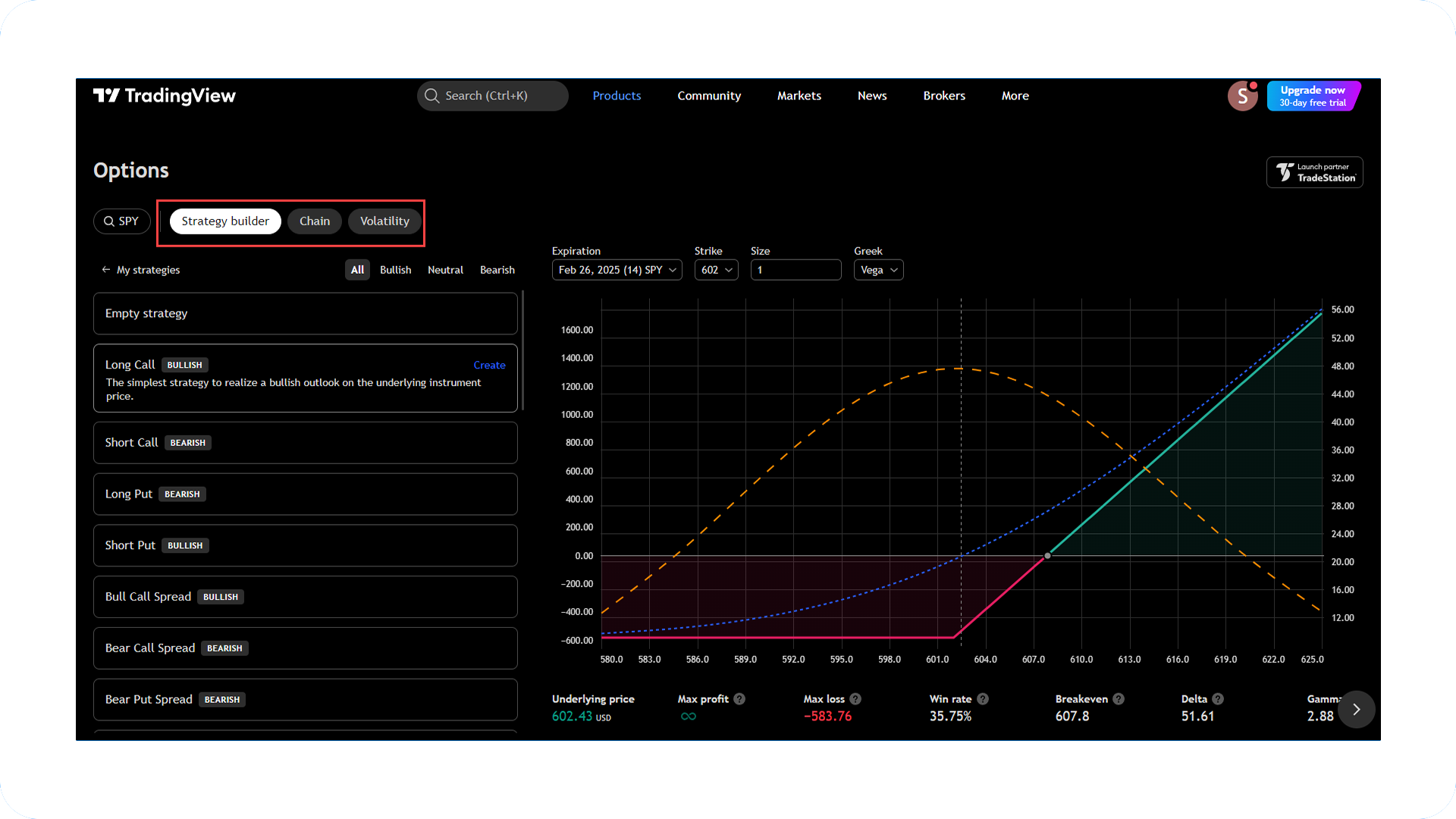
Build and analyze options strategies before you commit. Choose your contracts and strategy, then review the analysis across time, implied volatility, and the Greeks.
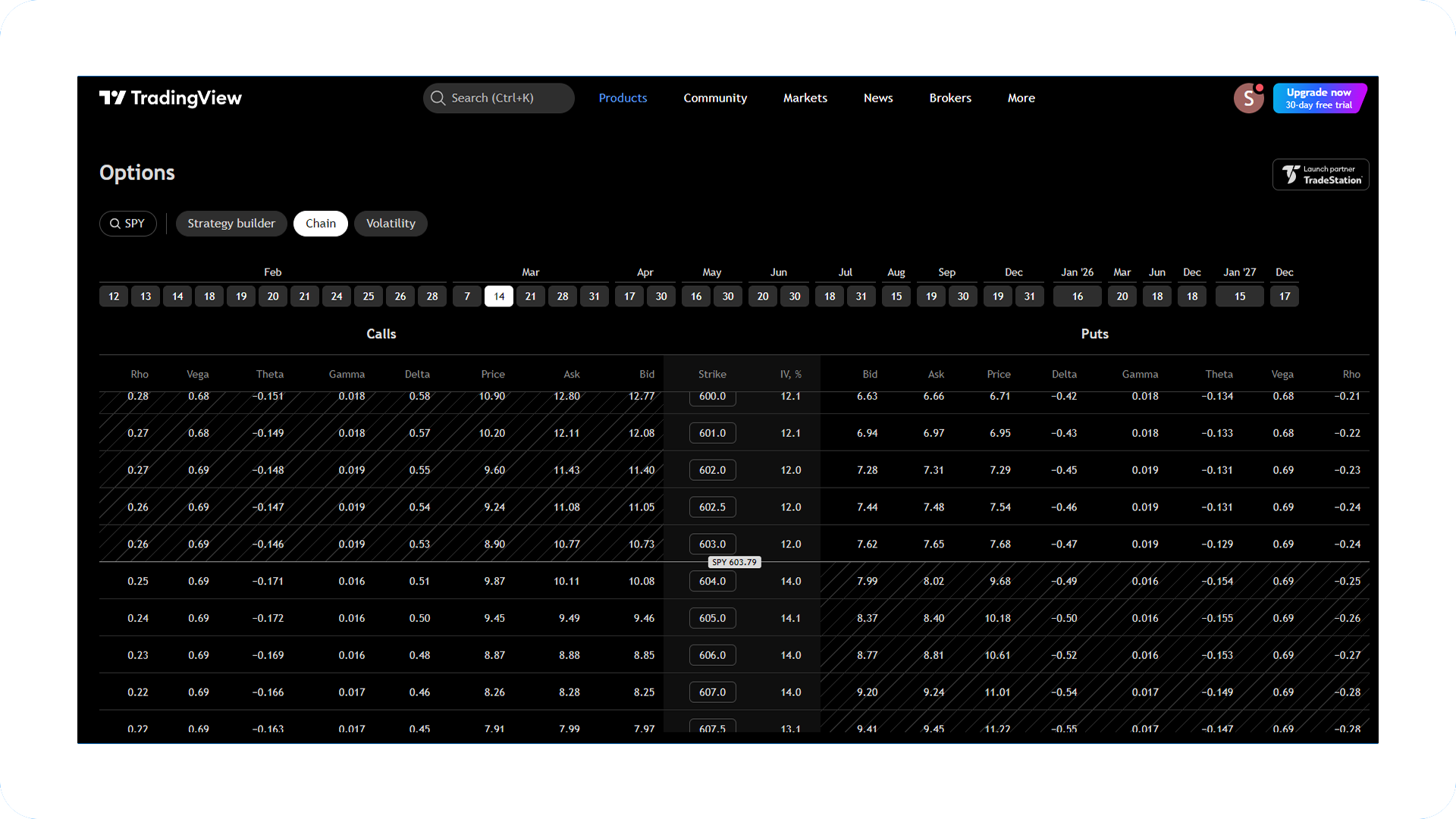
Review available series for any stock option at a glance. Select a contract to see additional details, then drop it into the strategy builder or view an overview.
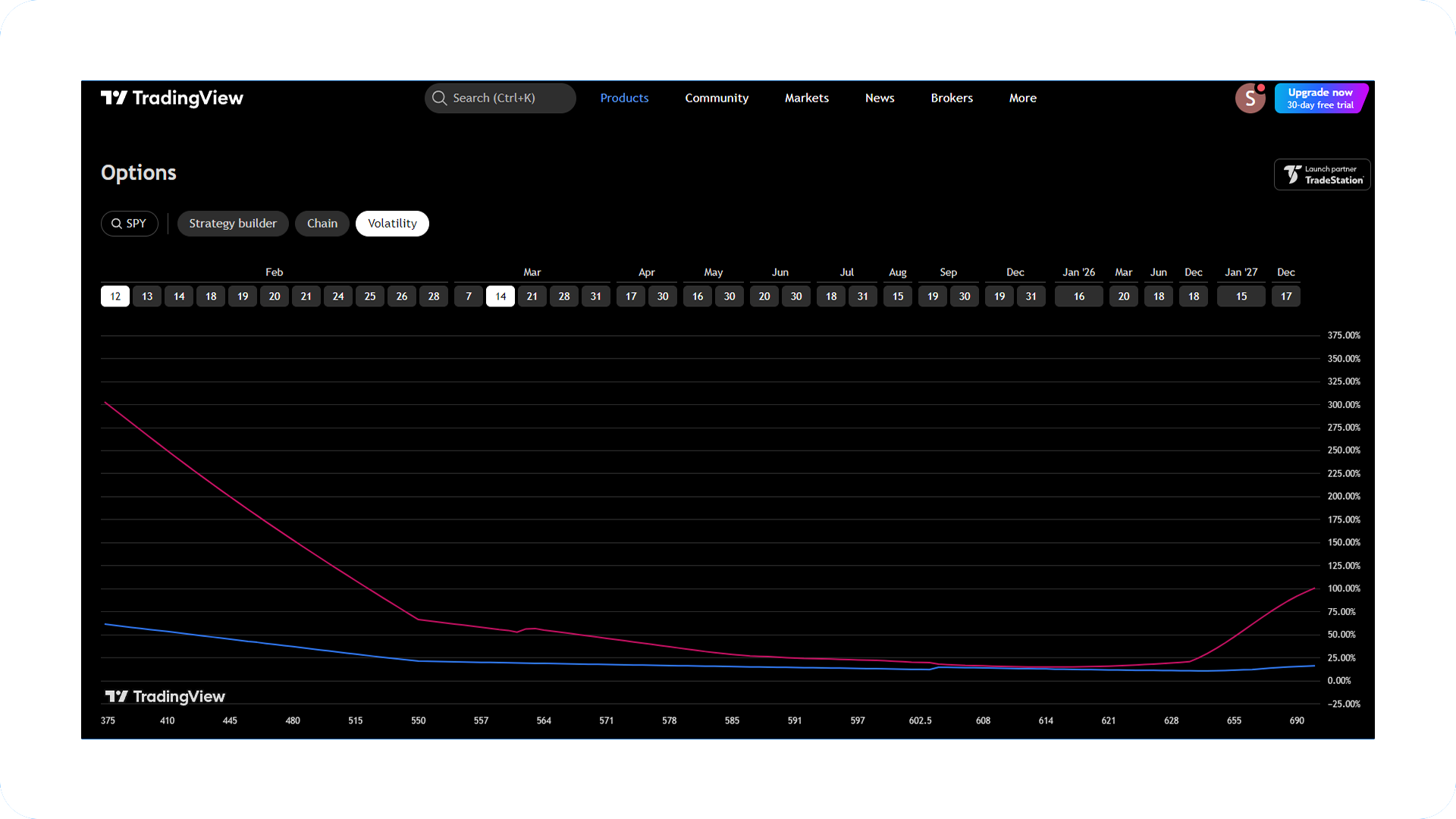
View stock and options volatility metrics directly on the chart. Select a custom date range to analyze volatility over any period.
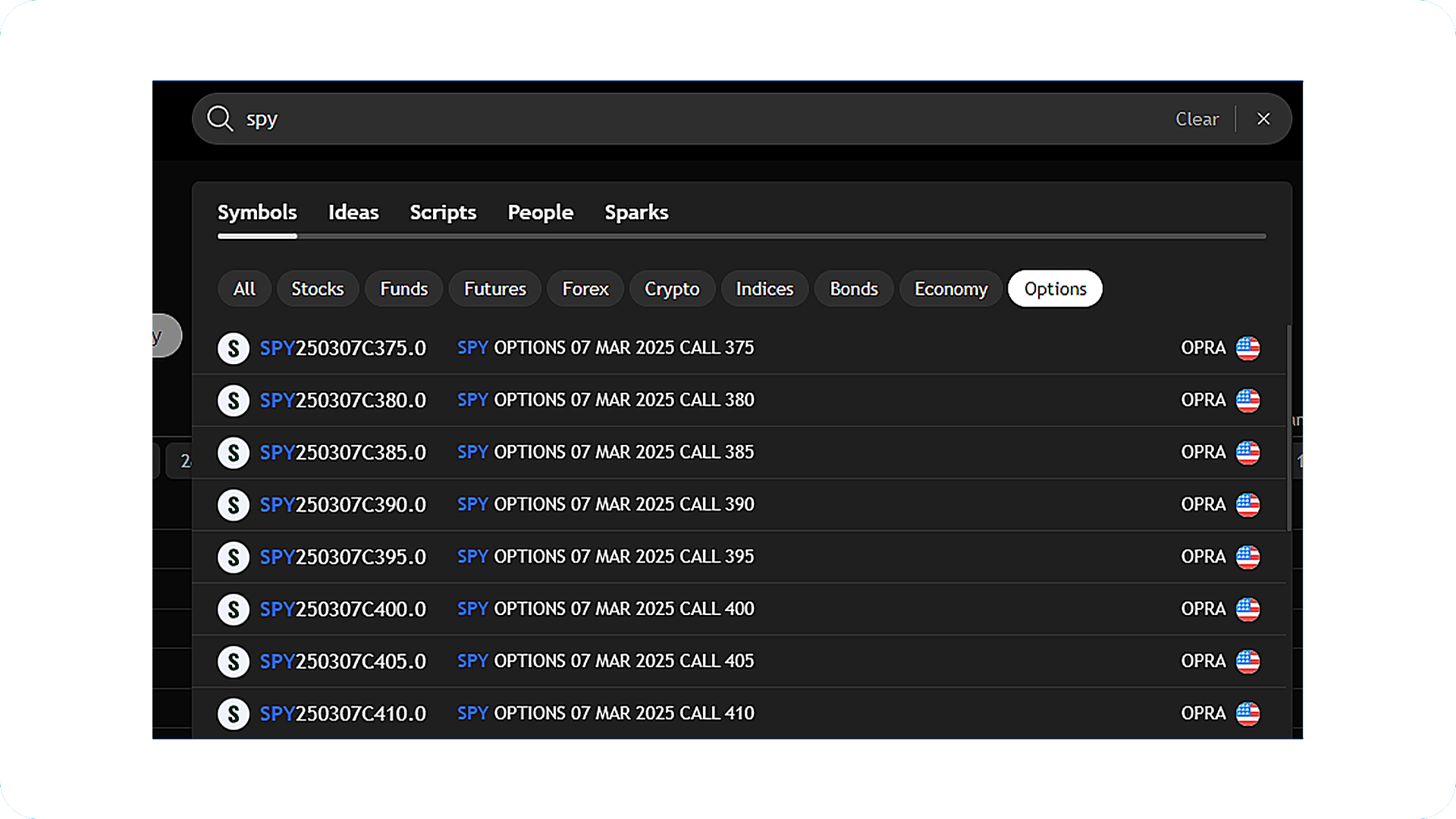
Search for options right from TradingView's main page. Enter the underlying stock and the available options populate accordingly. From there, view any contract on a chart or jump to the overview.
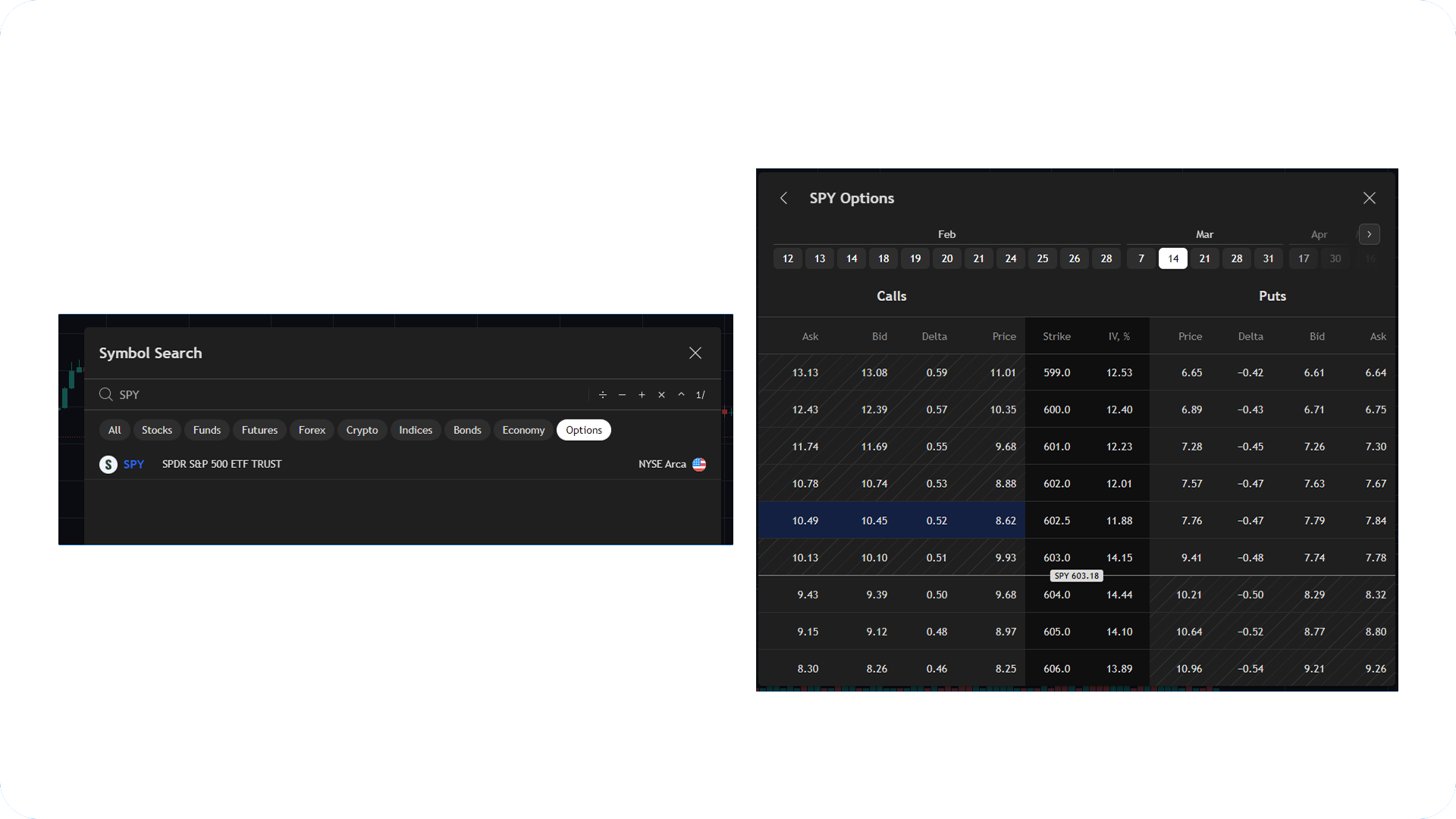
Search for options from within the chart view. Select a stock to open the options chain, filter by expiration and strike, and place the contract directly on your chart.
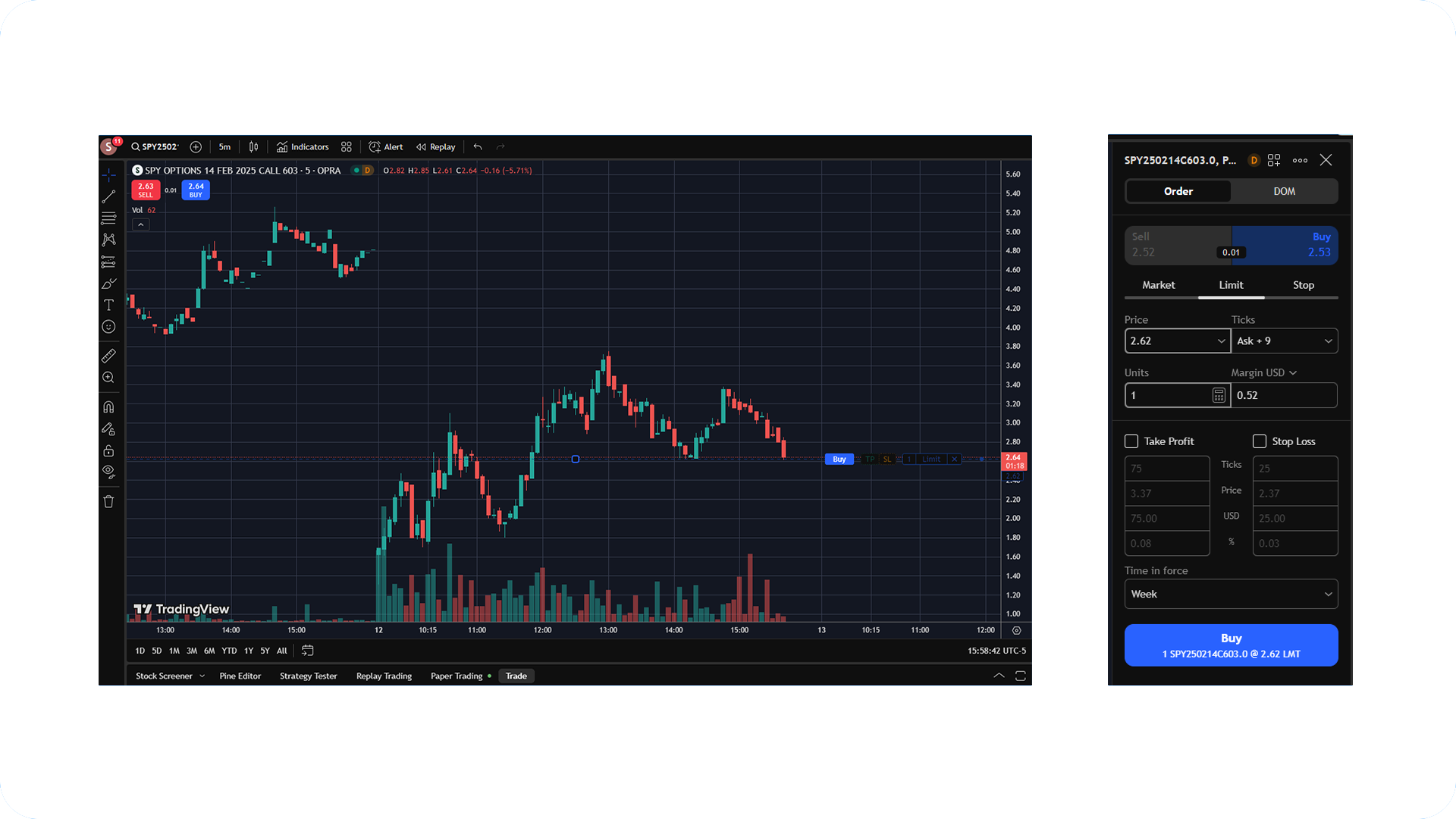
Ready to trade? Open the order ticket, set your parameters, and send the order. TradeStation handles the routing and execution. That's it.

Clients welcome in many countries. Offer eligibility varies.
Individual, joint, retirement, and entity accounts available.
Fund via bank link, wire, ACH, check, or broker transfer.
Earn extra income on positions you hold. Eligible accounts.†
TradingView pricing

COMMISSION-FREE TRADING**
$0
COMMISSION
Standard exchanges supported
.svg)
PER CONTRACT FEE APPLIES
$0
COMMISSION
$0 commission per contract

PER CONTRACT, PER SIDE
$0.50
COMMISSION
Low capital requirements

PER CONTRACT, PER SIDE
$0.85
COMMISSION
Plus exchange and NFA fees

More than four decades of building for active traders means we know what serious trading actually requires. From platform architecture to order routing, our foundation is purpose-built, battle-tested, and constantly evolving.

Access the same caliber of tools that institutional traders rely on, including direct-market access across major asset classes, advanced charting with 360+ indicators, and portfolio-level analytics built for sophisticated strategy execution.

From EasyLanguage strategy automation to our TITAN X platform, we're always building what's next.
Born traders demand technology they can customize to their needs and strategies. With a deep roster of built-in and third-party tools, the TradeStation ecosystem is designed to let you trade on your terms.

Trade stocks, options, and futures directly from any TradingView chart, with full Level II market depth pushed via our API.

Our next-generation professional trading platform. Advanced charting, powerful analytics, and direct-market access.

Direct REST API endpoints. The same technology that power our own platforms, now available to you.
Connect your TradeStation account to ChatGPT or Claude directly via our MCP. Access AI-powered trading that fits your workflow.

Bring the tools you already trust.
.svg)
EasyLanguage strategy automation, RadarScreen, and advanced charting. Built for traders who want more control.

The same account and execution on whichever device you're using. Your trading tools, designed to travel with you.
360+
Indicators + studies available
135,000+
TradeStation clients on TradingView¹
2025
TradingView Broker of the Year²

New TradeStation clients opening an individual, IRA, entity, or joint equities and futures account with $5,000 or more in new assets. Institutional and other tax-qualified accounts are not eligible for this offer.
You have 45 days from when the promo code is applied to your new account to fund with $5,000 or more in new assets. Assets transferred from an existing TradeStation account do not qualify.
Your first $50 credit posts in the month after your 45-day funding period ends. Subsequent credits post monthly for up to five months total, as long as you maintain your $5,000 balance and stay connected to TradingView each month.
You need to maintain your initial $5,000 balance to qualify for each monthly credit. If your balance drops below $5,000 during a qualifying month, the remaining credits will not be paid.
No. One offer per client, on one account. This offer cannot be combined with other TradeStation promotional offers.
No. The credits are deposited into your TradeStation account and you can use them however you choose. You can apply it toward a TradingView Premium subscription if you'd like, or you could use the credits to explore a new asset class or test new strategies.
The $0 commission on stocks and $0 per options contract applies to orders routed through TradingView. Outside TradingView, standard TradeStation commission rates apply. Visit tradestation.com/pricing for details.
Rolling over a 401(k) used to mean paperwork and chasing down your old provider. Now you can initiate a rollover into a TradeStation IRA entirely online, with support to help coordinate with your former plan.
Interested?
Start your rollover →
Note: A rollover is just one of the options you may have; you can also leave assets in your former plan, move them to a new employer's plan, or take a cash distribution, each with different implications.


StockBrokers.com, 2026 | #1 Innovation + Best-in-Class across key categories
Learn more
TradingView, 2025 | Broker of the Year (TradingView Broker Awards)
Learn moreStockBrokers.com, 2019-2025 | Multi-year Best-in-Class recognition
Learn more
Technical Analysis of Stocks & Commodities, 2025 | Readers' Choice Awards, 20+ year streak
Learn moreSpend more time focusing on refining your strategy with Private Brokerage, an elevated trading experience for the most-active market tacticians. Top-tier service, personalized experiences, exclusive access, and more await.