Get paid to wait: the cash-secured put strategy your platform can’t handle

Stocks Head for Record Drop as War Escalates
The pain is growing on Wall Street as fighting escalates in the Middle East.

Call toll-free 800.328.1267

You’ve done the work. You’ve identified a stock you want to own. You know the sector. You know the fundamentals. You’ve drawn the support levels on the chart and you know exactly where you’d pull the trigger on a buy.
But you’re not buying at the market price. You’re smarter than that. You want to get paid to wait for your entry. You want to sell a cash-secured put at the strike where you’d buy the shares anyway and collect premium while the market decides whether to give them to you.
The thesis is clean. The math is straightforward. The execution should be simple. But without the right tools, it’s not.
On a standard retail platform, you’re toggling between three different apps to make this work. You chart the underlying on one screen. You flip to a separate options chain to find the right strike and expiration. You open a basic order ticket to enter the trade. Each step is a separate silo with no shared intelligence between them.
But the real damage isn’t the extra clicks. It’s the opportunities you never see. You run the workflow on your top five conviction names and call it a day because doing this for 20 or 30 tickers is physically exhausting. Meanwhile, three stocks in your watchlist are showing elevated IV Rank and you’ll never know because your tools can’t surface the signal.
This isn’t slippage on one trade. This is a systematic leak. It’s the “retail tax” applied to your entire put-selling strategy – the cumulative cost of never seeing the full picture across your portfolio.
Selling cash-secured puts is an institutional-grade income strategy. You’re underwriting risk, collecting theta, and setting your own entry price. This is often how institutional investors and endowment funds accumulate positions.
So why are you running it through a retail toolkit that treats each trade like an isolated event? Give it the treatment it deserves.
The problem isn’t your thesis. It’s that your workflow is fragmented across disconnected interfaces. You need a platform ecosystem that connects the entire chain, from identifying the opportunity to modeling the risk, executing with precision, and managing the position on the go.
TradeStation solves this with a connected workflow that spans its entire ecosystem. You find the idea in TradingView or other third-party tools. You analyze and execute in TITAN X. You manage from your phone. Each platform specializes in what it does best, and they all feed the same execution engine.
Here’s how you stop toggling and start extracting premium across your entire portfolio.
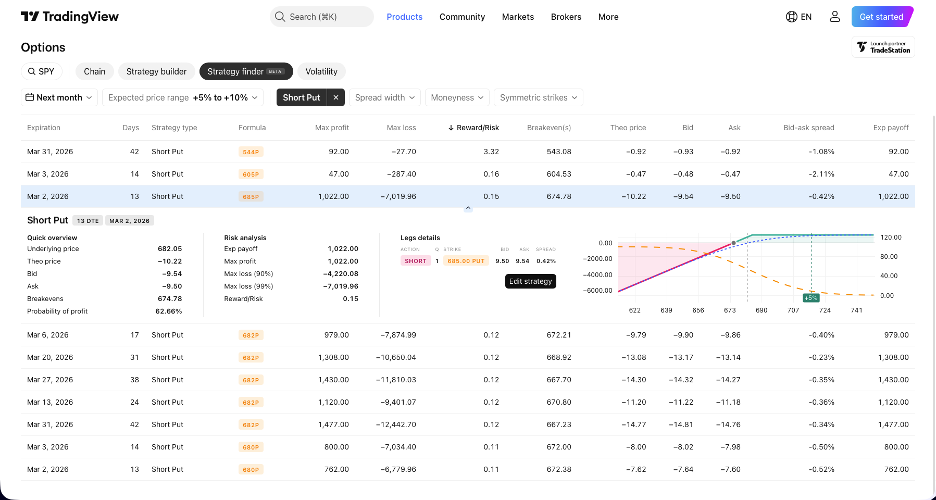
You don’t sell puts blindly. You sell them when implied volatility is rich, when the market is overpaying for downside protection on a stock you’re willing to own. The first step is finding those anomalies across your entire watchlist, not just the two or three names you happen to be looking at.
You might start where many sophisticated traders already live, TradingView. Use TradingView’s charting and screening capabilities to identify stocks sitting on strong technical support levels. These are names where the fundamental thesis is intact, the chart structure is bullish, and you’d happily own shares at a specific price. TradingView’s strength here is equity analysis, identifying the underlying targets before you model the options.
Because TradeStation connects to a broad ecosystem of third-party platforms, including TradingView, Option Alpha, MultiCharts and ORATS, your analysis tools don’t have to live inside a single interface. Capabilities vary by provider and account type, but the principle is the same: use the platform that best fits your scanning style and route the execution through TradeStation’s infrastructure.
By doing this, you start your session with a curated list of high-conviction names sitting on support with elevated IV. Not three. Not five. Every qualifying ticker on your watchlist.
You’ve identified the targets. Now you need to design the extraction. Drop the first symbol into TITAN X’s options chain.
This isn’t a basic chain with bid and ask columns. TITAN X displays real-time Greeks inline (Delta, Gamma, Theta, Vega) right next to each strike. You can add probability columns and customize the view to show exactly the data you need for your decision.
For a cash-secured put, you’re looking at the put side. You filter the chain to your target expiration, 30 to 60 days out, where premium is rich and theta decay begins to accelerate. The days-to-expiration label on each expiration tab helps you gauge the holding period at a glance.
You click the strike that matches your target entry price. The trade ticket slides in from the right. Before you’ve committed a dime, TITAN X shows you the max profit, max loss, and breakeven for the position. You see the net credit you’ll collect and the assignment price you’re accepting. No mental math. No spreadsheet.
Want to compare? Click a different strike. The calculations update instantly. Slide to a different expiration. The entire risk profile recalculates in real time. You’re not guessing which strike offers the optimal premium-to-risk ratio. You’re modeling it live.
If you’re managing multiple cash-secured put positions across a portfolio and need to see aggregate Greeks or stress-test assignment scenarios across all of them simultaneously, OptionStation® Pro on the Desktop app provides 3D risk graphs and portfolio-level Greeks analysis. But for evaluating and placing individual positions, TITAN X handles the workflow you need.
A cash-secured put is a single-leg trade. There’s no spread to leg into, no multi-leg routing complexity. But that doesn’t mean execution quality is irrelevant. Every cent of premium matters when you’re underwriting equity risk.
You’ve modeled the trade in TITAN X. The strike is selected. The credit is confirmed. You set your limit price inside the bid-ask spread, forcing the market makers to come to you, and click the Send Order button.
TradeStation’s intelligent order routing seeks the best available execution across multiple options exchanges. You’re not just getting filled. You’re getting filled at a price that helps preserve your edge. The same execution engine that routes complex multi-leg spreads is now working for your single put sale, seeking price improvement where available.
The confirmation appears at the bottom of your layout. The position is live. The premium is credited to your account. Now the real work begins.
This isn’t a scalp. You’re holding this position for days, maybe weeks. You don’t need to stare at a screen. You need to know that your platform is watching for you.
This is where the TradeStation Mobile App becomes your command center. Your position syncs instantly. The put you sold in TITAN X appears on your phone with real-time P&L updating every tick.
Set push notifications for the price levels that matter. If the underlying drops toward your strike, your phone buzzes before you’d even think to check. If implied volatility collapses and theta has done its work, you see the profit accruing in real time and can decide whether to let it ride or close early to free up capital.
Need to roll the position? You don’t walk back to your desk. You open the app, tap the position, and execute the roll. You’re buying to close the near-term put and selling to open a further-dated contract. The net credit or debit is displayed before you confirm. You’ve extended the trade, collected more premium, and you did it from a park bench.
Here’s the critical detail: when you place a stop-loss or bracket order, it resides on TradeStation’s execution servers, not your device. If your signal drops or your phone dies, those orders remain active at the server level. Stop orders do not guarantee a specific execution price, of course, especially in fast-moving or gapping markets. But automation helps you follow a plan, even if it cannot completely eliminate gap risk, liquidity risk, or fill uncertainty. You’re untethered from the desk, but disciplined risk management still starts with you.
There’s a reason institutional desks run this playbook on repeat. The cash-secured put isn’t a one-time trade. It’s the entry point of a compounding income cycle.
If the put expires worthless, you keep the premium and sell another one. If you’re assigned, you now own shares at your target price, below where the stock was trading when you sold the put. You’ve effectively gotten paid to buy the dip. Of course, assignment also means you’re now carrying stock-like downside risk if the underlying continues to fall.
Once you hold those shares, the next step is obvious. You can begin writing covered calls against the position. You’ve transitioned from extracting premium on the downside to extracting premium on the upside. The same TradeStation ecosystem that found the put opportunity, modeled it, executed it, and managed it now powers the covered call workflow.
This is what separates a trader who sells puts from a trader who manages a portfolio income engine. The strategy compounds. The tools enable the compounding.
Cash-secured puts are a defined-risk strategy, but the risk is real and significant. If the underlying stock declines sharply, you are obligated to buy shares at the strike price regardless of how far below it the stock has fallen. Because equity options are typically American-style, early assignment can occur at any time before expiration, not only at expiration. The premium collected offsets a portion of the loss, but it does not fully protect you in a severe downturn. Assignment requires holding cash equal to the full contract value, which ties up substantial capital. The tools described in this article help streamline the workflow, but they cannot eliminate the inherent market risk of selling options. Every position should be sized with discipline, and you should never commit capital you cannot afford to have assigned.
Your cash-secured put strategy is only as good as the workflow behind it. If you’re manually hunting for premium across 30 tickers on a platform that treats each trade like an isolated event, you’re leaving efficiency on the table.
Scan for the volatility edge in TradingView. Model the risk in TITAN X. Execute with an engine that pursues price improvement on every fill. Manage from your phone without losing protection.
Connect the chain. Extract the premium. Compound the cycle.
Trade like you were born to do this.
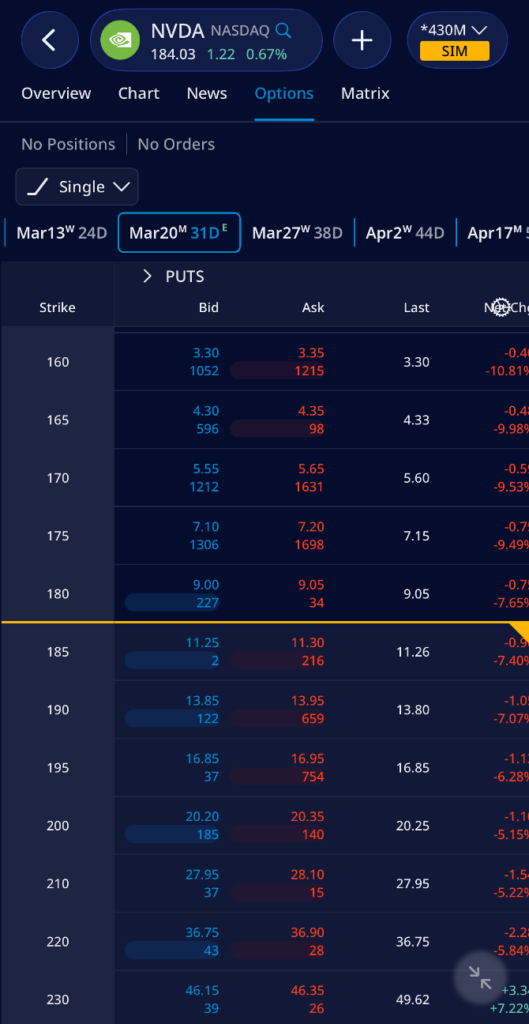
TradeStation Mobile
Disclosure:
Options trading is not suitable for all investors. Your TradeStation Securities’ account application to trade options will be considered and approved or disapproved based on all relevant factors, including your trading experience. See www.TradeStation.com/DisclosureOptions. Visit www.TradeStation.com/Pricing for full details on the costs and fees associated with options.
Margin trading involves risks, and it is important that you fully understand those risks before trading on margin. The Margin Disclosure Statement outlines many of those risks, including that you can lose more funds than you deposit in your margin account; your brokerage firm can force the sale of securities in your account; your brokerage firm can sell your securities without contacting you; and you are not entitled to an extension of time on a margin call. Review the Margin Disclosure Statement at www.TradeStation.com/DisclosureMargin.

The pain is growing on Wall Street as fighting escalates in the Middle East.

Master a directional futures trading strategy from analysis to execution. Learn to use Titan X Matrix, TradingView integration, and server-side brackets for E-mini breakouts.

Vertiv has been a quiet beneficiary of the AI boom and now it’s getting noticed.