The futures trading strategy playbook: from breakout to bracket in three platforms

AI Stock ‘Stays Cool’ as Iran War Rages
Vertiv has been a quiet beneficiary of the AI boom and now it’s getting noticed.

Call toll-free 800.328.1267
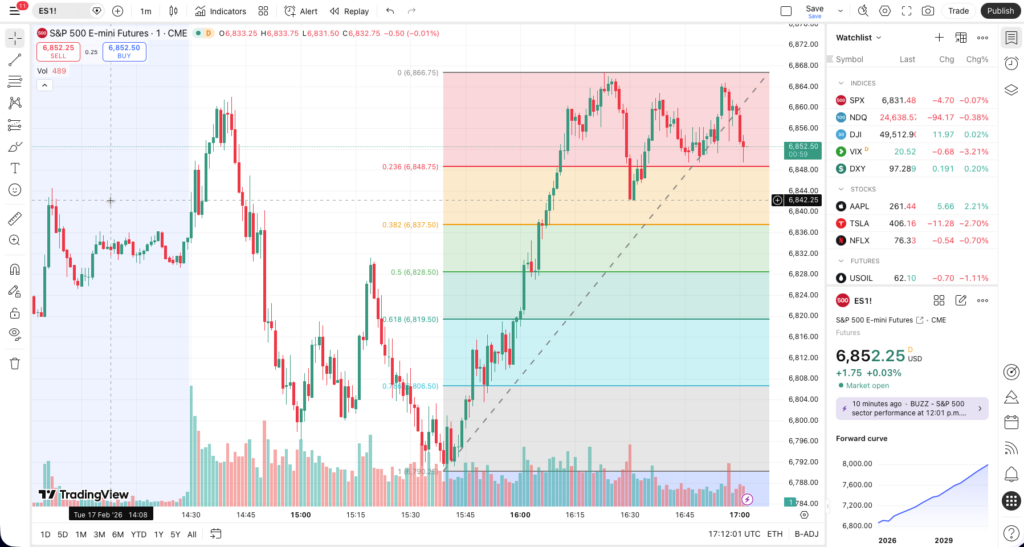
The E-mini S&P 500 is pressing into a range you’ve been watching for three sessions. Volume’s compressing. The Fibonacci retracement off the last swing low is holding at the 61.8. Your thesis is clean: this breaks higher, and it breaks fast.
But you’re analyzing the setup in one application, switching to a separate execution window to place the order, and toggling back to a third screen to set the bracket. By the time your limit order is live, the breakout candle has already closed above your entry. You watched the move happen across three disconnected tabs.
This is the Retail Tax on futures. It’s not just the tick of slippage on the fill. It’s the compounding cost of a workflow where your analysis, your execution, and your risk management live in separate silos that don’t talk to each other. You’re right on the thesis. You’re late on the entry. And the gap between those two things is an infrastructure problem, not a skill problem.
Your read is institutional. Your infrastructure shouldn’t be retail.
You don’t need another charting tutorial. You need a workflow where the chart, the order book, and the bracket order are connected by the same execution engine, so the distance between “I see it” and “I’m in it” is measured in clicks, not minutes.
TradeStation’s ecosystem is purpose-built for directional futures trading: analyze on TradingView, execute on TITAN X Matrix, and manage from your phone. All hitting the same account, the same positions, the same server-side orders. Three platforms. One engine. Zero gaps in the workflow.
Here’s what that looks like on a bullish E-mini breakout.
You’re already on TradingView. A lot of serious futures traders are. The charting is well-suited for building a directional thesis: Fibonacci retracements, volume profiles across sessions, trendlines snapped to wicks, multi-timeframe layouts that let you confirm the daily structure on a 15-minute trigger.
What changes with TradeStation is what happens after the thesis is built.
Combining TradeStation and TradingView means you can place and manage orders directly from the chart. Right-click a price level, select TradeStation as your broker, and your limit or stop order is live, routed through TradeStation’s execution infrastructure without ever leaving TradingView’s interface. Order lines sit on the chart. Your position can update in real time. You can drag a stop or adjust a target the same way you’d move a trendline.
TradeStation’s integration with TradingView runs deep. It’s the same integration philosophy across the TradeStation ecosystem: analyze where you want, execute through a broker that can actually keep up. And TradingView is just one potential path. TradeStation also integrates with partners like Bookmap, TradersPost, QuantConnect, OptionsPlay, and others. The ecosystem is designed so your preferred front-end connects to professional-grade execution.
But when the breakout is forming and you want the full depth of the order book in front of you, there’s a faster lane.
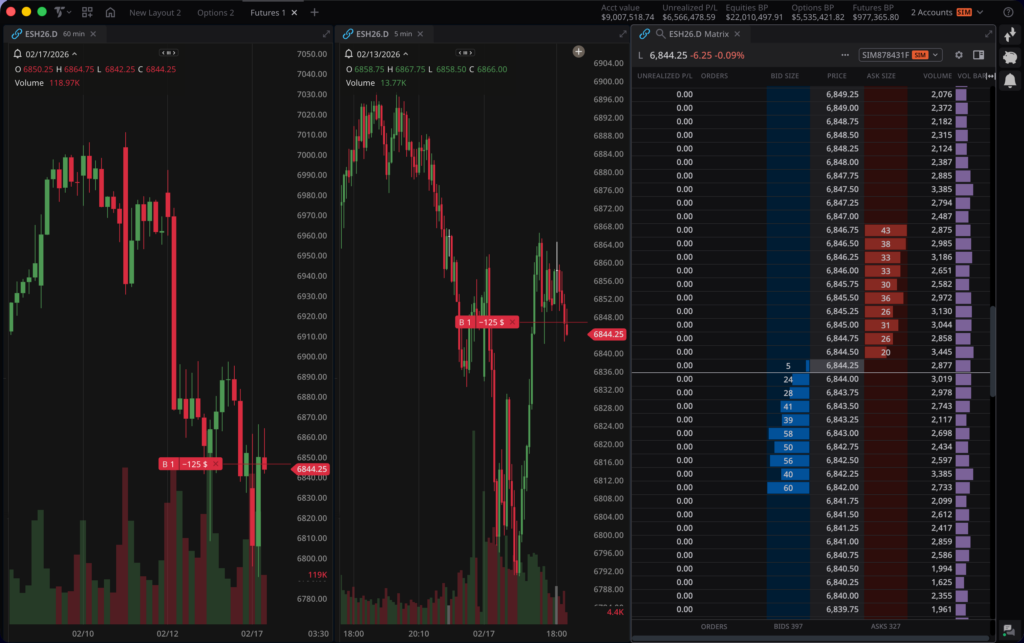
The TITAN X Matrix is where directional futures trading gets tactile.
The Matrix displays real-time market depth on a price ladder (bid and ask volume at each price level) so you can see exactly where buyers and sellers are concentrated. This isn’t a static Level II window. It’s a live read on the order book that updates tick by tick, showing you the liquidity landscape before you commit capital.
Execution can be one click. Tap a price level on the Ask side and your buy order is live. Want to adjust? Drag the order to a new price. The Matrix also lets you build bracket orders visually. Drag to set the take-profit and stop-loss directly on the ladder. You can see your P&L context before the trade goes live, and adjust the ladder to dial into the exact price level you want.
For multi-leg risk management, OSO and OCO orders display with clear visual links between primary and secondary orders, so you can see the relationship between your entry, your target, and your stop at a glance.
Here’s the critical point: you can execute this same trade directly from TradingView OR from the TITAN X Matrix. Two paths, same execution engine, same order execution quality. That flexibility is the ecosystem advantage. The thesis was built on TradingView. The execution happens wherever gives you the best read on the moment, and both routes land in the same account, with the same server-side order management.
The bracket order is set. Take-profit above the breakout target. Stop-loss below the consolidation range. The orders live on TradeStation’s execution servers (not on your laptop, not in a browser tab, not dependent on your WiFi connection).
This is where the TradeStation Mobile App becomes your position command center. Real-time streaming quotes show your futures position updating tick by tick. Push notifications can alert you to fill confirmations, price triggers, and order status changes. You can adjust stops, tighten targets, close the position, or reverse direction, all from your phone.
The distinction matters: on some platforms, certain conditional orders may depend on the client application remaining connected. On TradeStation, bracket and OCO orders are designed to remain active on the server regardless of your connection status. Your phone dies, your WiFi drops, you’re on an airplane with no signal: the stop-loss is still live on TradeStation’s servers. You’re untethered, but you should not feel unprotected.
And because the mobile app connects to the same account and execution engine as TITAN X and TradingView, every adjustment you make from your phone is reflected everywhere. Tighten the stop on mobile, and it’s updated on the Matrix. Close the position from TradingView, and the mobile P&L zeros out. It’s one position, managed from anywhere.
For traders who need custom EasyLanguage automation for their futures strategies, the desktop platform adds that layer.
Futures trading involves substantial risk of loss and is not suitable for all investors. Leverage in futures magnifies both potential gains and potential losses, and it is possible to lose more than your initial investment. Margin requirements for futures positions may vary between intraday and overnight holding periods, and changes in margin requirements can result in margin calls that require immediate additional funds.
Futures markets can experience significant price gaps, particularly during overnight sessions or around major economic events. These gaps may result in fills at prices substantially different from your intended levels. Stop orders do not guarantee a fill at your specified price and can execute at materially worse prices in fast-moving or gapped markets.
Server-side order management is designed to help ensure your orders remain active regardless of your device’s connection status, but no system can guarantee execution at a specific price in all market conditions.
The scenarios described in this article are hypothetical and for educational purposes only. They do not represent actual trades or guarantee future results. Past performance is not indicative of future results.
Three platforms. One execution engine. A futures workflow where your analysis, your execution, and your risk management aren’t duct-taped together across disconnected applications. They’re integrated by design.
You analyzed the setup on TradingView because the charting is where you build your thesis. You executed on TITAN X Matrix because the order book depth gave you conviction on the entry. You’re managing from your phone because the bracket is server-side and the position is live everywhere.
That’s not a workaround. That’s infrastructure built for how professional futures traders actually operate.
Trade like you were born to do this.
Futures trading is not suitable for all investors. To obtain a copy of the futures risk disclosure statement visit www.TradeStation.com/DisclosureFutures. Visit www.TradeStation.com/Pricing for full details on the costs and fees associated with futures trading.
Margin trading involves risks, and it is important that you fully understand those risks before trading on margin. The Margin Disclosure Statement outlines many of those risks, including that you can lose more funds than you deposit in your margin account; your brokerage firm can force the sale of securities in your account; your brokerage firm can sell your securities without contacting you; and you are not entitled to an extension of time on a margin call. Review the Margin Disclosure Statement at www.TradeStation.com/DisclosureMargin.
TradingView, Bookmap, TradersPost, QuantConnect, OptionsPlay, and other third-party platforms referenced are not affiliates of TradeStation and TradeStation does not endorse their content or strategies. Third-party integrations are subject to their respective terms of service.

Vertiv has been a quiet beneficiary of the AI boom and now it’s getting noticed.

Stocks are whipsawing after the White House suggested it may de-escalate the Iran war.

Volatility is rising as geopolitical and economic risks increase. How will natural born traders react?