Updated Mobile App: A Big Win for Options Traders?

TITAN X Has Arrived. Matrix Will Never Be the Same
The next generation of our award-winning platform has arrived, with powerful new tools and functionality.

Call toll-free 800.328.1267

TradeStation has updated its mobile app to help users trade, manage and monitor options more easily. The new functionality is especially powerful for complex, multileg strategies.
Traders can begin with their positions by tapping on the TradeStation logo at the bottom of the main screen.
The new mobile options-grouping experience makes it easy to add options to existing stock holdings. Tap on a position to activate a menu that can be pulled up to reveal buttons like Overview, Chart and Options.
Tapping “Options” will activate the options chain. Calls are on the left and puts are on the right. Expirations are listed across the top. A small letter “E” appears on the weeks when quarterly earnings are due, which can help identify periods when a stock may face greater risk or volatility.
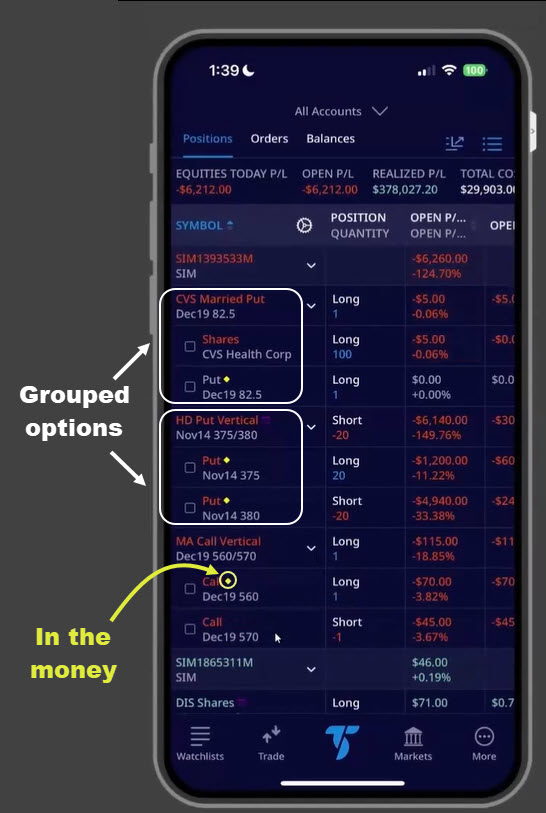
TradeStation’s mobile app showing multiple positions.
The next powerful feature groups options in different views based on strategy, original entry or impact on margin. This can help users track and manage multiple strategies with less confusion.
Returning to positions, items are grouped according to their underlying symbol. Tapping on the grouping menu at the top right opens the Grouping menu. Here are some of the views associated with the different buttons:
Note: Customers can tap the expandable row arrow to expand a row and see the included options.
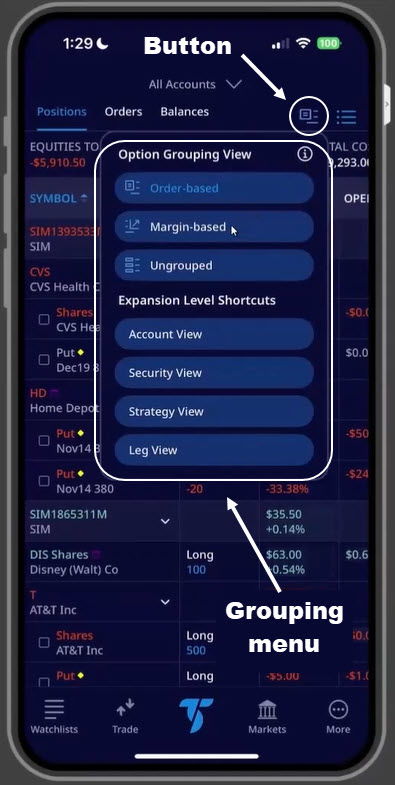
TradeStation’s mobile app, with grouping menu shown.
Vertical spreads are a common method for taking positions with options. Traders purchase one contract near the money and sell another further from the money. That generates credit to reduce risk, potentially leveraging a move between the two strike prices.
This can be accomplished on TradeStation’s new mobile experience by selecting “Custom” from the dropdown menu at the top of the options chain.
Users can tap on the Ask price of the leg they wish to buy and the Bid price of the contract they wish to sell.
Both contracts will appear in the order ticket at the bottom. The Trade button can then be tapped to proceed.
The same process applies to credit spreads, except contracts closer to the money are sold (tapping Bid). Calls/puts further from the money are purchased by tapping Ask.
Note: The mobile app uses yellow to mark when contracts are in the money. This appears as a line on options chain. (Puts above the line are in the money, while the opposite is true for calls.) Yellow diamonds mark in-the-money contracts on grouped views.
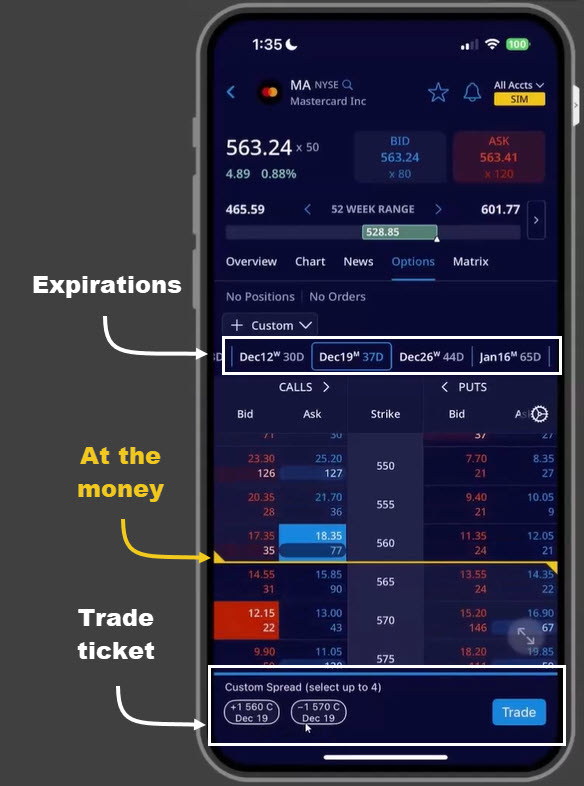
Mobile app’s options chain, with key features marked.
Options trading is not suitable for all investors. Your TradeStation Securities’ account application to trade options will be considered and approved or disapproved based on all relevant factors, including your trading experience. See www.TradeStation.com/DisclosureOptions. Visit www.TradeStation.com/Pricing for full details on the costs and fees associated with options.
Margin trading involves risks, and it is important that you fully understand those risks before trading on margin. The Margin Disclosure Statement outlines many of those risks, including that you can lose more funds than you deposit in your margin account; your brokerage firm can force the sale of securities in your account; your brokerage firm can sell your securities without contacting you; and you are not entitled to an extension of time on a margin call. Review the Margin Disclosure Statement at www.TradeStation.com/DisclosureMargin.

The next generation of our award-winning platform has arrived, with powerful new tools and functionality.

TradeStation HUB is a browser‑based workspace that lets you see positions, manage orders, and place new trades from a single, streamlined view. It focuses on clear navigation and in‑line controls so you can act quickly without jumping between multiple windows.

Options confuse a lot of investors because several factors impact their value. Unlike stocks, they don’t just go up and down based on supply and demand. This post will explain three of the most important concepts you need to get started: time, volatility and intrinsic...