TradeStation TITAN X Is Coming Soon

Analyzing Markets with Advanced Charting on TITAN X
Learn to use technical studies, customizable charting tools, and drawing features in TITAN X.

Call toll-free 800.328.1267

The next generation of our award-winning* platform is coming soon: TradeStation TITAN X.
TITAN X revolutionizes customers’ experience in stocks, options and futures. It’s for highly active traders needing to customize workspaces and views for different strategies and market conditions. TITAN X’s intuitive design makes it easy to adjust positions and orders. Natural-born traders deserve nothing less.
The features described in this article will be available to a small set of Beta users soon, with plans for general release in the near future.
The first innovation of TITAN X is the ability to customize workspaces by placing tools from a convenient toolbar.
Users simply click on the toolbar button at the top left (next to the TradeStation T). A set of tools will appear, which can be pulled into the main workspace. The apps can be dragged to the right or left of existing windows, which will then snap into a new shape to fit.
Customers can also drag apps into the tab row at the top of individual windows, making them occupy the same space with other tools.
This lets you easily keep desktops with key tools and views. The entire layout can be saved or renamed by right-clicking on the Layout tab at the top of the main window.
TITAN X maintains the symbol-linking functionality of other TradeStation platforms. That means a symbol selected in one app will automatically populate in another app if they have the same link color.
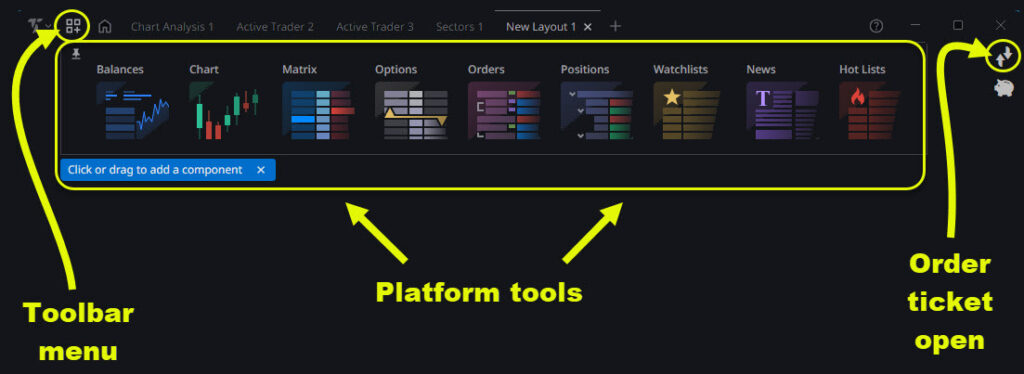
TITAN X toolbar showing key features mentioned in this article.
For example, you might link a chart to an options chain so that a stock entered in one will appear in the other. Or you might link a watchlist and a chart so that stocks clicked in the watchlist automatically load in the chart.
Next, all apps can be easily maximized and minimized with the arrows icon in the top right.
These apps are now available:
Options chains have existed for decades in their standard format, with calls and puts listed on either side of the strike prices. However the complexity of expirations and trading has increased — and TITAN X has evolved with the market.
First, the new options chain is easy to adjust. Users can hide either calls or puts to conserve space and focus on the key information. (See the buttons marked “All,” “Calls” and “Puts” near the top of the window.) They can also grab and drag column items like volume, open interest or delta to rearrange their view.
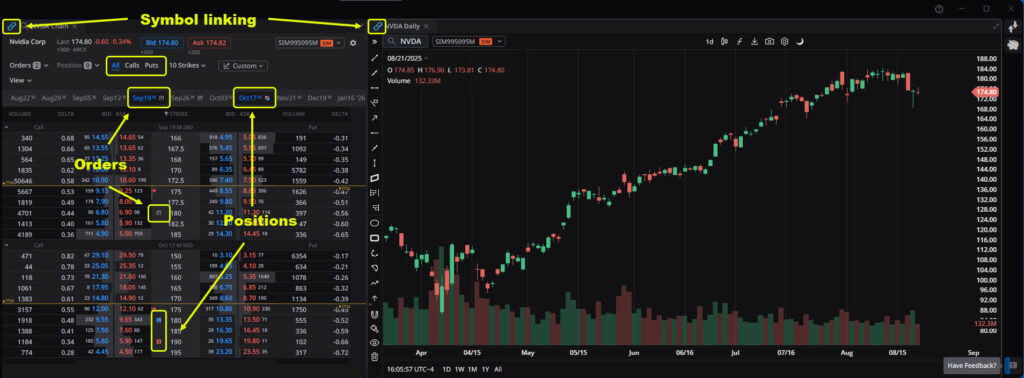
TITAN X platform showing options chain and chart for Nvidia (NVDA). Notice the selected features.
Second, long or short positions in an underlying symbol are displayed at the top of the options chain. This can save time for traders looking to sell covered calls or add protective puts to current holdings.
Third, expiration dates appear at the top of the options chain and can be toggled open and shut with single mouse clicks. Expirations with orders are flagged with a notepad icon. Expirations with positions are flagged with red and green arrows (representing long and short).
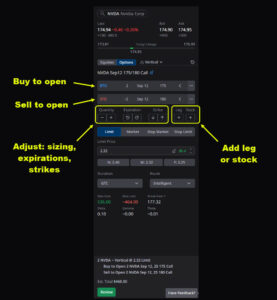
TITAN X Trade Ticker ticket showing NVDA options.
TITAN X also features a more powerful trading ticket, which is available by clicking the icon at the top right with arrows pointing up and down. (Clicking again closes the ticket.) By default it shows the last symbol viewed.
This tool includes several key improvements, while keeping core functionality like choosing order type, duration and routing.
First, the new trade ticket supports options. Intuitive controls let users toggle between BTO (buy to open) or STO (sell to open). Long or short legs can be conveniently added to create complex strategies. Stock positions can also be added.
Traders not wanting to scroll through dozens of expirations and strikes can navigate with easy-to-use buttons.
Second, there are three ways to size a transaction:
Visit www.TradeStation.com/Awards to learn more.
Options trading is not suitable for all investors. Your TradeStation Securities’ account application to trade options will be considered and approved or disapproved based on all relevant factors, including your trading experience. See www.TradeStation.com/DisclosureOptions. Visit www.TradeStation.com/Pricing for full details on the costs and fees associated with options.
Margin trading involves risks, and it is important that you fully understand those risks before trading on margin. The Margin Disclosure Statement outlines many of those risks, including that you can lose more funds than you deposit in your margin account; your brokerage firm can force the sale of securities in your account; your brokerage firm can sell your securities without contacting you; and you are not entitled to an extension of time on a margin call. Review the Margin Disclosure Statement at www.TradeStation.com/DisclosureMargin.

Learn to use technical studies, customizable charting tools, and drawing features in TITAN X.

Explore how FuturesPlus supports futures spread trading with tools for product discovery, advanced filtering, MD Trader execution, Spread Matrix visualization, and custom spread construction using Auto Spreader. Review how to analyze and manage both exchange-listed and synthetic spreads within a structured trading workflow.

Welcome to HUB, which brings together direct market access and comprehensive portfolio oversight in a clean and efficient interface.